Demo App using sym3.js
Download the demo app
sym3.js needs to be hosted on its own server to function correctly.
Download the demo website below:

⚠️Note
If you are using this demo with Sym3 version 9 (before Sym3 started to use websocket secured in v10), you will have to change the following javascript code (in script.js):
From:
SYM3 = CreateSym3(27000, "localhost", true);
To:
SYM3 = CreateSym3(27000);
Using Visual Studio
A simple way to start working with sym3.js is to launch IIS Express through Visual Studio.
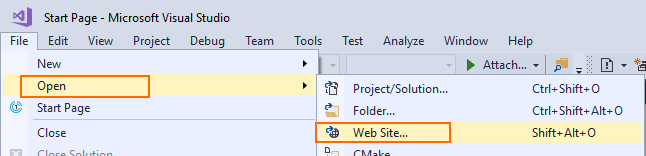
In Visual Studio, open the web site:
Using Visual Studio Code
- Open the folder with Visual Studio Code
- In the Extensions Panel, make sure you have the extension Live Server (from Ritwick Dey)
- Open
index.html - in Visual Studio Code status bar, click on Go Live