Requirements
sym3.js provides a client for the Sym3 Operator Server that runs on any modern web browser.
Installing Sym3 Operator Server
As the first version of Sym3 Operator Server that supports the web client is 7.18, please ensure that you have at least 7.18 installed.
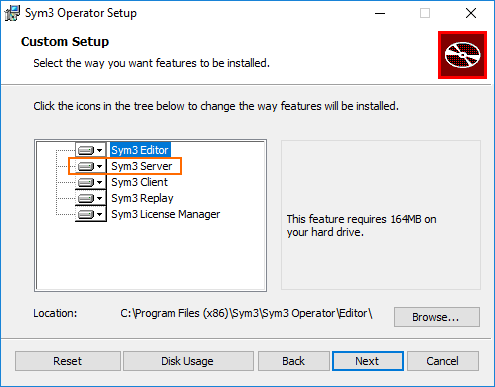
While installing Sym3 Operator Server, ensure that the ‘Sym3 Server’ component is selected.
Configuring Sym3 Operator Server
Once Sym3 Operator Server is installed, you will have to publish a project. If you are new to Sym3, you will need first to learn how to create and publish a project. See the Sym3 Operator Help for more details.
Communication between the server and the web client is enabled by default. To change this setting, please log on to your Sym3 Administration Page. Go to Settings > Operator Server and tick Enable Websocket. Please note also that the default port is 27000. This value will need to match the port that sym3.js tries to connect on, so be sure to update your client code if you do change the port from 27000.
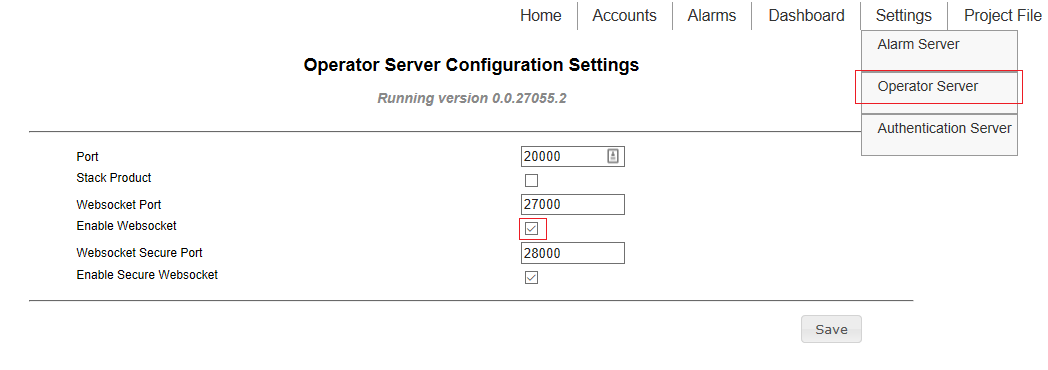 If you require the wss protocol (secure WebSocket), you can configure it here. Note that you can run both an insecure WebSocket server and a secure WebSocket server at the same time, so be sure to disable the regular WebSocket if you don’t need it. Your server will have to have a TLS certificate associated with the secure port, and your client code will have to specify that it wants a secure connection. (See CreateSym3 for more details.)